
How to Specify a Warehouse Inventory Scanner That Survives the Floor
How to Specify a Warehouse Inventory Scanner That Survives the Floor
A warehouse inventory scanner is the cheapest device in your operation and one of the most expensive to get wrong. A mis-specified scanner does not fail loudly. It fails as a 6% cycle-count variance, a missed ASN, a pick rate that drops by a fifth, and a fleet replacement eighteen months early. Most procurement problems we see are not price problems — they are specification problems, where a buyer compared headline scan ranges and IP ratings instead of the actual workload profile of the building.
This guide covers how to specify one properly: which scan engine tier you need, what IP rating is warranted versus overspecified, how to compare battery claims like-for-like, and how to build an RFQ that gets comparable answers from Zebra, Urovo and a China-direct factory.
What a Warehouse Inventory Scanner Actually Has to Do
Strip away the marketing and a warehouse inventory scanner has four jobs, and only the first is about barcodes.
- Capture — read the barcode on the pallet, carton, shelf edge or bin.
- Decide — run the WMS or ERP client: receive, put-away, pick, pack, cycle count.
- Survive — a full shift of use, drops onto concrete, forklift vibration, cardboard dust, a freezer-aisle charge cycle.
- Integrate — Bluetooth scanners, vehicle mounts, cradles, an MDM that can enrol 300 units without a manual step.
Most spec sheets describe item 1 in detail and item 3 in one line. That is the wrong emphasis. The scan engine determines read reliability on damaged labels; the battery, sealing and ergonomics determine whether the device is still in a worker’s hand at hour ten. Weight matters more than most spec sheets admit: a scanner that causes wrist strain gets set down on a pallet, and a scanner on a pallet gets dropped or stolen.
Scan Engine: The Spec That Actually Decides Throughput
There are three practical tiers, and they are not priced the way buyers assume.
| Tier | Typical read range | What it uses | Where it fits | Relative cost |
|---|---|---|---|---|
| Standard-range 2D imager | 15–40 cm (6–16 in) | Basic area imager | Receiving, retail cycle counts, light pick faces | Baseline |
| Mid-range 2D imager | 40–100 cm (16–40 in) | Advanced imager with auto-focus | Full-case picking, mixed-height stacks, dock apron | Mid |
| Long-range / DPM | 1–6 m (3–20 ft) | Long-range optics or laser-assisted DPM | Rack-level and yard-level scanning, pallet from a cart | Highest |
For reference, Zebra’s SE4720 sits in the mid tier and the SE55 extends to roughly 40 ft (12 m) — which is why a TC53 configured with SE55 is quoted well above a TC53 with SE4720. Urovo’s DT50 ships an integrated 1D/2D imager covering the standard-to-mid range, which is why it has gained share in mid-market logistics.
The honest procurement point: over-reading distance is wasted money and added bulk. If your pickers work face-level from a carton, a long-range engine adds cost, weight and decode time without improving a single scan. Long-range optics trade near-field edge performance for distance — you lose something reading a label at 15 cm. Ask for the 90th-percentile read distance in your workflow, not the maximum.
IP Rating: Warranted Level vs. Overspecified Level
IP codes are defined under IEC 60529. The first digit rates solid-particle ingress (0–6, where 6 is dust-tight), the second rates water ingress (0–9). That is the entire framework, and it is frequently misquoted.
Two things buyers get wrong:
- IP67 is not “better sealed” than IP65. Both have a first digit of 6. The premium buys you the second digit: temporary immersion (typically 1 m for 30 minutes) instead of low-pressure water jets from a 6.3 mm nozzle. If your scanners are never hosed down and never submerged, that premium buys nothing.
- IP ratings say nothing about drop resistance. That is a separate standard (MIL-STD-810H, Method 516.8 for transit drop). Zebra specifies 6 ft / 1.8 m drops to concrete across the full operating temperature with a boot; Urovo’s DT50 is rated at 1.5 m. Those figures are not comparable without surface and temperature conditions, so ask for the full test report rather than the single number.
| Rating | Solids | Water | Realistic warehouse fit | Cost impact |
|---|---|---|---|---|
| IP54 | Limited dust ingress | Splashing from any direction | Indoor picking areas, dry-goods storage | Baseline |
| IP65 | Dust-tight (6) | Low-pressure jets, any direction | General warehouse, dock doors, food packing, coolers | Moderate |
| IP67 | Dust-tight (6) | Immersion to 1 m / 30 min | Cold chain with condensation, yard and dock work, wash-down | Highest |
Recommendation: IP65 is the correct minimum for a distribution centre with forklift traffic and routine hose-down. Go to IP67 only if the fleet enters wash-down zones or condensation-heavy cold storage. Specify IP54 only for a genuinely climate-controlled picking floor.
Battery Life: Comparing Claims on a Like-for-Like Basis
Battery runtime is the most frequently misquoted specification in this category, because vendors test different things. Zebra publishes “up to 15 hours” for the TC53 standard battery (4,680 mAh, 18.01 Wh). Urovo publishes “typical operation time ≥10 hours” for the DT50’s 4,300 mAh cell. Neither tells you what your shift will feel like, because both are measured under a lab profile lighter than real picking work.
The variables that actually decide runtime:
- 5G radio state. A modem holding a 5G connection with poor signal draws far more than one parked on Wi-Fi. A device flipping between 4G and 5G in a weak-coverage yard can lose 20–30% of nominal endurance.
- Scan engine duty cycle. Continuous trigger pulls on a mid-range imager measurably outlast a light-duty one.
- Screen brightness. A 600-nit panel outdoors at full brightness is a meaningful load.
- Battery health, not nameplate capacity. A 4,300 mAh cell at 80% health after 18 months of shift charging delivers roughly the endurance of a 3,440 mAh new cell — the most common cause of “the batteries don’t last as long as they used to.”
| Factor | Effect on real shift endurance | Evidence to request |
|---|---|---|
| 5G enabled vs Wi-Fi only | 20–30% shorter shift on mixed 4G/5G fallback | Runtime with radio in each state |
| Battery capacity (mAh and Wh) | Linear; Wh is the honest unit | Compare Wh, not mAh |
| Cycle life | Degradation compounds after ~300 cycles | Cycle test data, not a claim |
| Warm-swap battery | Removes downtime entirely if supported | Confirmation on the specific SKU |
| Charge time | A 30-minute 50% QC charge limits mid-shift downtime | Charge curve, not a claim |
Brand Comparison: Zebra, Urovo, and the Factory-Direct Option
| Dimension | Zebra TC53 | Urovo DT50 | Factory-direct (Kingtop KP18 / KP26 class) |
|---|---|---|---|
| CPU / RAM | Qualcomm 6490 2.7 GHz; 4–8 GB | Octa-core 2.2 GHz; 4 GB | MediaTek Helio-series, 4 GB + 32 GB expandable |
| Display | 6.0″ FHD+, 600 nits, optically bonded | 5.7″ TFT LCD, 720×1440 or 1080×2160 | 5.5–6.0″ HD+; verify nits in the datasheet |
| Sealing | IP65 / IP68 | IP65 / IP67 | Typically IP65 — confirm the test report |
| Drop | 6 ft / 1.8 m per MIL-STD-810H | 1.5 m | Commonly 1.5 m — request method and surface |
| Battery | 4,680 mAh standard; 7,000 mAh extended | 4,300 mAh typical | 4,000–5,000 mAh; hot-swap on selected SKUs |
| Android lifecycle | Long commercial support window | Android 9–11 era on this model | Android 11–13 typical; verify patch horizon |
| Indicative unit price | Highest tier | Mid tier | Lowest tier |
| Best suited to | Multi-site firms with MDM contracts | Regional 3PLs, retail, moderate budgets | Volume fleets, OEM/private-label rollouts |
Two honest caveats. First, the Android security patch horizon on value-tier devices is the most under-evaluated risk in this category — a fleet on unsupported builds will eventually be blocked from your MDM console, so ask for a written patch-support commitment. Second, the total-cost gap narrows faster than unit price suggests, because warranty terms, spare-part availability and battery replacement cost all scale with who you buy from. Build a five-year TCO, not a unit price comparison.
A 10-Point RFQ That Gets Comparable Answers
Send the same ten questions to every supplier and require written answers.
- Which model and SKU are you quoting, and what scan engine tier?
- Provide the IEC 60529 IP test report — who tested it, on which hardware revision?
- Provide the MIL-STD-810H drop report — which method, height, surface, sample size, cycle count?
- What is the rated battery capacity in Wh, and measured shift endurance with 5G active?
- What is the guaranteed security patch end date for the Android build shipped?
- What is the MOQ, and unit price at 100 / 500 / 1,000 units?
- Can you apply private-label branding — logo, model name, boot screen, packaging? At what cost and MOQ?
- Which accessories exist: cradle, multi-slot cabinet, vehicle mount, holster, spare batteries?
- What is the warranty term, RMA turnaround, and where does replacement stock sit?
- Can you supply CE, FCC, RoHS, and battery UN38.3 / IEC 62133 documentation?
Frequently Asked Questions
Do I actually need an IP67 scanner in a dry warehouse?
No, and this is the most common over-specification we see. IP67 protects against immersion to 1 m for 30 minutes. In a dry warehouse the exposure is splashes and dust, which IP65 covers. Buy IP65 and keep the budget for spare batteries and a charging cabinet, which affect uptime more than the seal rating will.
Is a higher-resolution screen worth paying for?
Usually not for scanning work, yes for proof-of-delivery photo capture. A 720p panel is adequate for a WMS pick list. If operators photograph damaged packaging at receiving, prioritise a good rear camera over display resolution — and note that higher-nit panels draw more power, which shortens the shift.
How many spare devices should a 300-unit fleet hold?
Roughly 5–8% of fleet size, plus a separate battery spares pool. Spares should match the deployed fleet’s model and firmware so they drop straight in. Budget for batteries separately — battery failure, not device failure, dominates replacements.
Is it worth waiting for a 5G scanner model if 4G is already deployed?
For most warehouse floors, no. Wi-Fi and 4G coverage inside a warehouse are usually the limiting factor, not the modem generation. Upgrade to 5G only for yard operations with genuinely high data throughput needs — video uploads, large parcel images, or on-device processing. See our separate comparison of 5G vs 4G PDA terminals for the full breakdown.
Talk to a Factory Directly
If your fleet is in the hundreds and your requirement is stable, it is worth pricing the same specification from a factory-direct supplier as well as from a distributor. The factory quote removes the distributor margin layer, and OEM/ODM programmes can change the hardware profile entirely — private-label branding, custom boot screens, pre-loaded MDM profiles, modified accessories — at a volume a distribution channel cannot justify.
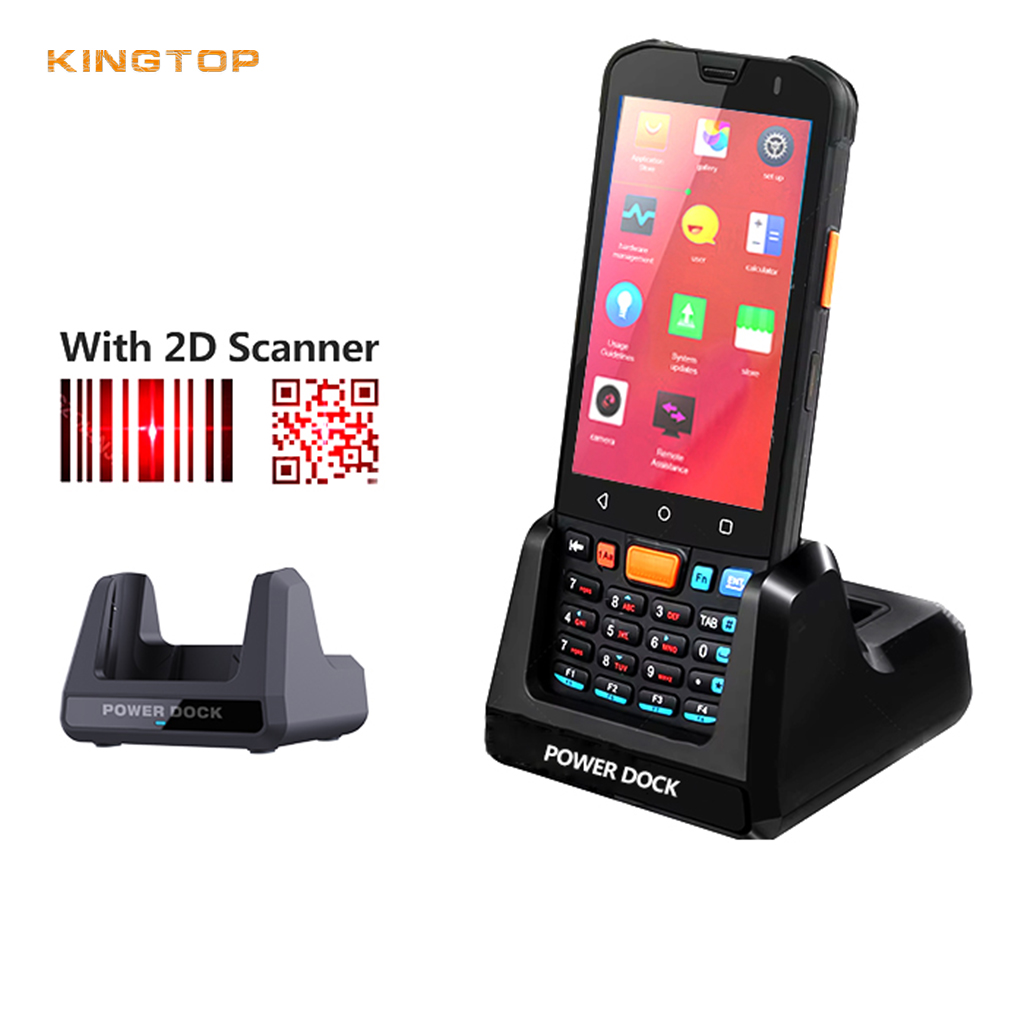

At Kingtop we build 4G and 5G PDA terminals for wholesale and OEM programmes, including the KP18 and KP26 families covering the standard and mid-range scan tiers above. Send us the RFQ from section 7 and we will tell you honestly which tier you need, including where we would recommend spending less.
Author: Kingtop Product Team — Kingtop is a China-based manufacturer of PDA terminals, mobile hotspots, POS terminals, body-worn cameras and rugged tablets, supplying wholesale, OEM and ODM programmes worldwide.
Last updated: 7 October 2026
Editorial policy: Competitor specifications are cited from manufacturer datasheets and published standards, verified against primary sources wherever possible. Recommendations reflect our assessment as a manufacturer, not a third-party benchmark. Corrections welcome.

About author




Add comment