
Mobile POS vs Handheld Computer for Retail: Which Device Does Which Job
Mobile POS vs Handheld Computer for Retail: Which Device Does Which Job
The short answer: a mobile POS terminal and a handheld computer are not the same product, and the difference is not shape or price — it is which side of the PCI payment-security boundary each sits on. A handheld with an NFC radio is not a payment terminal, and a payment terminal is usually a poor barcode-and-inventory tool. Many retail rollouts get this wrong by buying one device and asking it to be both.
One thing buyers need in 2026: the PCI SSC has opened a formal sunset period for the PCI SPoC and CPoC standards, running 1 May to 31 October 2026. If your mobile acceptance solution was validated under either, that window is open.
Kingtop is a China-based manufacturer of 5G PDA handhelds, mobile hotspots, POS terminals, body-worn cameras and rugged tablets. This guide compares the two device families a retail buyer actually picks.
What actually separates a mobile POS from a handheld computer?
A mobile POS terminal is built to capture cardholder data at the point of interaction. A handheld computer is built to run inventory and in-store apps in a cradle or a worker’s hand. The PCI Security Standards Council splits payment hardware into explicit device categories — PIN Entry Devices, Unattended Payment Terminals, Non-PIN acceptance devices, Encrypting PIN Pads, Secure Card Readers and Secure Card Readers for PIN — each listed separately. Definitions are on the PCI PTS POI page.
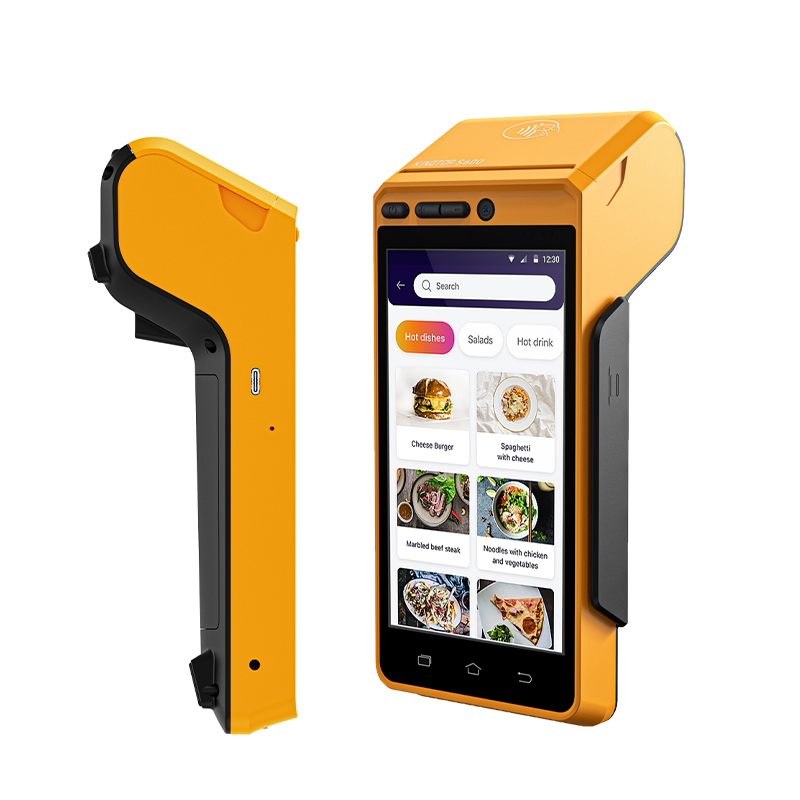

The practical consequence: a handheld can read an NFC tag for inventory, but the moment it captures a PIN it becomes a payment device in PCI’s eyes, and needs an approval the vendor must hold.
| Decision point | Mobile POS terminal | Handheld computer |
|---|---|---|
| Core job | Capture and encrypt cardholder data | Scan, count, look up, execute |
| PCI status | Holds PTS POI approval (PED/UPT class) | No payment approval; NFC is read-only |
| Typical mount | Counter stand or handheld | Cradle, wall mount, belt clip |
| Scanning | Limited to barcode-for-payment only | 1D/2D imager, often long-range |
| Ruggedness needed | Counter environment, low drop exposure | Aisles, stock rooms, carts, back doors |
| Session length | Minutes per transaction | Full shift, often 8–12 hours |
| Software free to roam | No — payment app is locked down | Yes — full app stack, MDM managed |
Do we need PCI PTS POI v7.0 for a retail handheld?
Usually not directly — but the version matters even when it does not apply to your device, because it tells you what your payment vendor had to build. The Council published PTS POI v7.0, with 59 requirement changes and 23 pieces of additional guidance.
Three changes in v7.0 affect retail projects. First, terminal security keys such as firmware authentication and tamper/storage keys must use cryptography with an effective key strength of 128 bits or stronger — Triple DES no longer qualifies. Second, a new requirement covers the physical and logical security of biometric interfaces, which matters if you plan fingerprint confirmation at checkout. Third, a new requirement permits third-party applications such as app stores, and mandates those environments stay segregated from anything handling cleartext PIN or account data.
That third point is what breaks retail deployments. The common wish is a handheld running the payment flow and a loyalty app, a coupon app and a delivery-partner app. Under v7.0 those apps must be sandboxed away from cleartext cardholder data — correct, but it makes the integration an architecture project, not a configuration switch.
Is our current mobile payment acceptance solution being retired this year?
Possibly, and time-sensitive. The PCI SSC has announced the formal sunset period for the PCI Software-based PIN Entry on COTS (SPoC) standard and the PCI Contactless Payments on COTS (CPoC) standard, both running 1 May – 31 October 2026, as confirmed on the Council’s standards library page. The successor is MPoC, Mobile Payments on COTS, which consolidates both and adds online PIN, manual card entry via camera, offline transactions and external secure card readers.
For an agreement signed two or three years ago: the hardware on your counter may be fine while the validation it depends on is being retired. Ask any payment software vendor for the exact programme and standard version their listing names, and its expiry date, before signing anything else.
| Mobile acceptance programme | Status in 2026 | What it covered |
|---|---|---|
| PCI SPoC | Sunset period 1 May – 31 Oct 2026 | PIN entry on a smartphone or tablet |
| PCI CPoC | Sunset period 1 May – 31 Oct 2026 | Contactless acceptance using built-in NFC |
| PCI MPoC | Current | PIN and contactless on one COTS device, plus offline and online PIN |
| PCI PTS POI v6.x | Approvals valid to April 2032 | Dedicated PIN pad / unattended terminal hardware |
| PCI PTS POI v7.0 | Published 2025 | Same hardware scope, tightened key and app rules |
One clarification, because it is widely misreported: PCI PTS POI is a security standard, not a law. The Council directs questions about which entities must validate compliance to the card brands. In practice acquirers require a valid listing before boarding a terminal, so the obligation arrives through your payment provider.
Can one device do both jobs in a store?
Partly — and the leading vendors are explicit about the limits. Zebra markets its TC53/TC58 as a mobile-device-centred workstation: drop the handheld into a cradle and connect a monitor, keyboard, mouse and printer. On the TC53/TC58 official specification page, the hybrid POS configuration lists the peripherals as a large display, a scanner, a receipt printer, a payment terminal, a keyboard and a mouse.
Read that list again. Even the vendor selling the “one device” story keeps a separate payment terminal in the loop. The handheld becomes the screen, scanner, printer manager and app host; it does not become the PIN pad. That is the correct security boundary, and why hybrid configurations lower deployment cost without lowering compliance.
For store hardware, a dedicated POS route is the S600 PCI PTS certified terminal, floor and stockroom coverage comes from the KP26 handheld family, and a lighter counter-only build is the V520 POS terminal. Specification sheets are on the Kingtop product pages.
How do mainstream handhelds compare on what matters at the counter?
| Specification | Zebra TC53 / TC58 | Urovo DT50 | Honeywell CT47 |
|---|---|---|---|
| Display | 6.0-inch FHD, 600 nits | 5.7-inch, 720×1440 | 5.5-inch FHD, 2160×1080 |
| Battery | 4,680 mAh standard / 7,000 mAh extended | 5,000 mAh removable | 4,775 mAh standard / 7,692 mAh extended |
| Cellular | TC58: 5G; TC53: Wi-Fi only | DT50: 4G; DT50 5G variant exists | 4G / 5G by SKU |
| Drop rating | 1.8 m booted; 1.5 m without boot | 1.5 m to concrete | 3.0 m booted at room temp; 2.4 m across −20 to 50 °C |
| Sealing | IP65 and IP68 | IP67 | IP65 and IP68 |
| Scan engines | SE4720 standard, SE55 to 12 m | Integrated 1D/2D imager | FlexRange XLR, 8 cm to 24 m |
Two honest observations. First, 5G is mostly irrelevant at a register. A transaction payload is a few kilobytes; store Wi-Fi or a 4G link clears it in under a second. Buy 5G when staff move between buildings with no Wi-Fi, not for the card swipe. Second, drop ratings are quoted with conditions and buyers routinely drop the condition. Zebra’s 1.8 m figure is a with-boot value; bare-device is 1.5 m. Honeywell’s 3.0 m is booted at room temperature, falling to 2.4 m across −20 to 50 °C. If a supplier quotes a drop number with no conditions attached, ask again.
How do we decide without over-buying?
Work from the failure you are actually solving. If the problem is queue length, the fix is a mobile payment terminal or a hybrid cradle configuration — not a new handheld platform. If the problem is stock accuracy, the fix is a scanning handheld and its cradle fleet, and the POS can stay put. Over-specifying is the more expensive mistake: an unused capability never shows up as a failure report, it just lowers the return on the invoice. Buy the narrower device.
What does a retailer most often get wrong?
The most common error is buying payment-grade security on a device that never takes a payment. A rugged, IP67, long-range handheld is built for drops, dust and gloves — that engineering is wasted on a counter that never moves. The mirror-image error is buying a slim, screen-focused POS for a stockroom needing a scan trigger and a full-shift battery.
How long should a retail handheld battery last?
Eight to twelve hours is the working target, covering a full shift with margin. Urovo states 8–12 hours for its 5,000 mAh pack. Zebra sells a standard and an extended option on the same device — the practical pattern for fleets: standard for short shifts, extended only where routes are long. Swappability matters more than raw capacity, because one tired worker can swap in a charged pack in ten seconds.
Do we need a rugged tablet as well as a handheld?
Usually one, not two. A rugged tablet earns its cost where work is visual and stationary — plan review, photo-heavy condition reporting, counter order entry — while a handheld earns its cost where work is mobile and repetitive. Running both in one store is duplication unless the use cases differ.
Where can we get the certification evidence before we buy?
Ask for the listing reference, not the logo. Kingtop publishes its certification portfolio on the credentials page, and the same discipline applies to any supplier: PCI PTS listing numbers, FCC ID, CE RED, the issuing body, and the expiry date. A certificate untraceable to a public listing is not a certificate.
About the author. Written by the Kingtop Product Team, a China-based manufacturer of 5G PDA handhelds, mobile hotspots, POS terminals, body-worn cameras and rugged tablets, supplying wholesale, OEM and ODM programmes worldwide.
Last updated: 15 October 2026. Standards references checked against PCI SSC, Zebra, Urovo and Honeywell published documentation on that date.
Editorial policy. Specifications come from vendor-published documentation, linked at the point of claim. Where a figure depends on conditions — a boot, a temperature range, a battery option — the condition is stated with it. Payment certification requirements change; confirm the current listing with your acquirer before committing.
Talk to us. Send your store count, register layout and current pain point, and we will tell you which device each station needs — including when the answer is “keep what you have.”

About author





Add comment